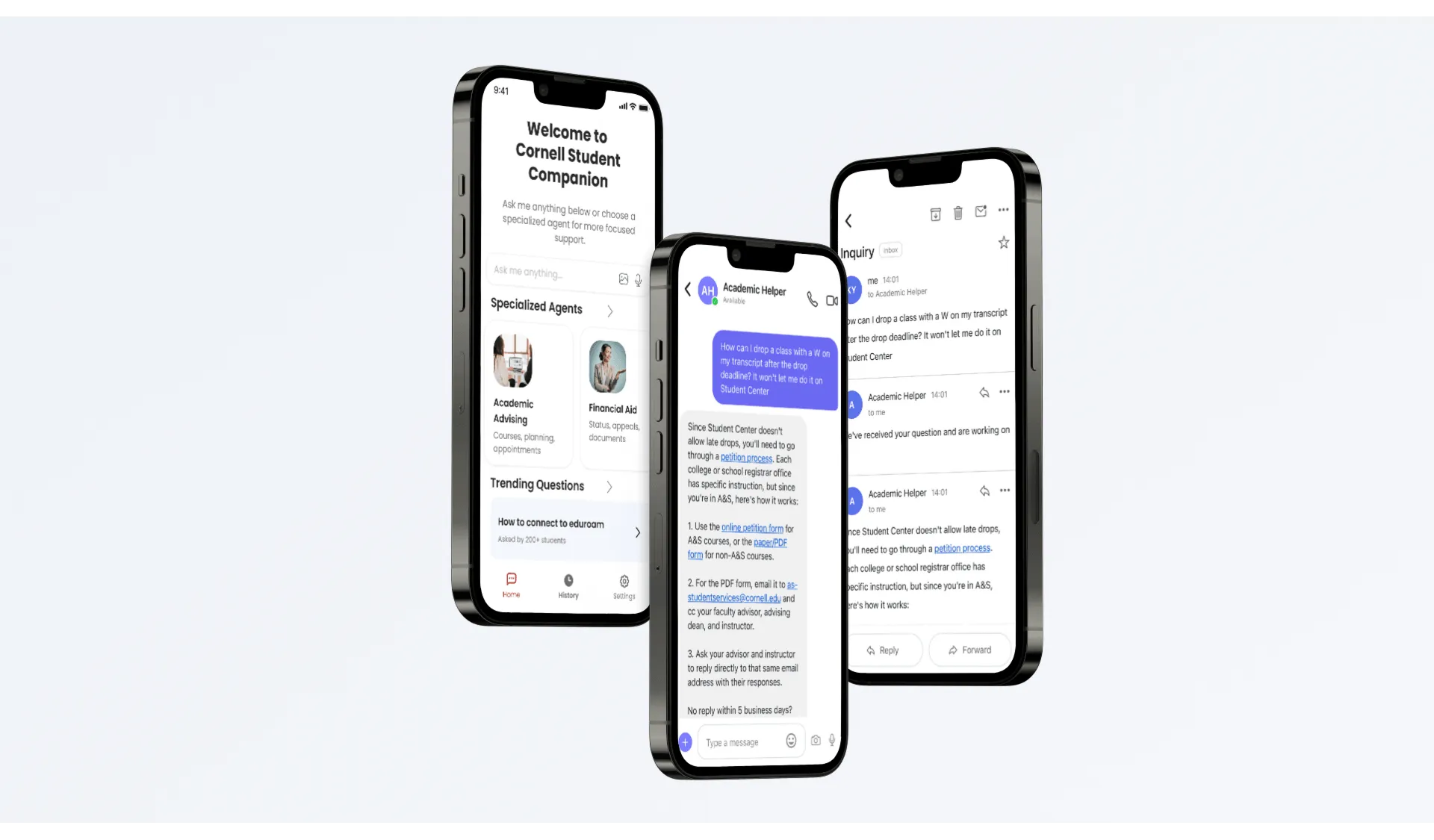
University support is fragmented across disconnected portals, office hours, and silos, causing long resolution delays and high abandonment. Existing campus chatbots compound frustration with rigid menus and unhelpful answers.
Duration3 months
RoleProduct Strategist & UX Designer
Team4 members
ToolsFigma, FigJam, Qualtrics
ResultAdopted by Unisys; modeled 60% deflection, $720k annual savings
My Role: I led product strategy from discovery through pilot planning: authored the PRD, defined the AI governance framework, designed the campus operating model, created the Canvas integration architecture, built the interactive Figma prototype, and co-ran the 30-student validation study.
Projected Impact
Looking at historical campus ticket volume and resolution patterns, these modeled projections
illustrate what a unified conversational system could achieve:
60%
Projected Tier-1 Deflection
$720k
Projected Annual Savings
5-6x
Projected ROI
Project Resolution
Following the final readout, Unisys adopted the proposed strategy
and architecture. The VP of Global AI Practice noted that the validated workflows,
governance rules, and deflection targets closely matched their internal roadmap, giving the
team what they needed to accelerate rollout.
Research & Methodology
Our team's approach combined several methods to build a clear understanding of the problem space:
stakeholder
interviews, a Qualtrics screener survey, in-depth student interviews, and a Wizard of Oz
study (prototypes designed to simulate a live AI without a production backend). Each method was
chosen to fill a specific gap in what we knew.
Phase I: Discovery & Context
About the Client
Unisys is a global technology company with an existing product called
Student Companion, a GenAI tool built to help students search through
textbooks. The product handled textbook Q&A well, but it didn't touch the everyday service
journeys
students actually struggle with. Our project goal was to expand it into a platform capable of
handling
financial aid,
IT support, and academic advising through a single conversational interface.
Archetype Mapping & Journey Prioritization
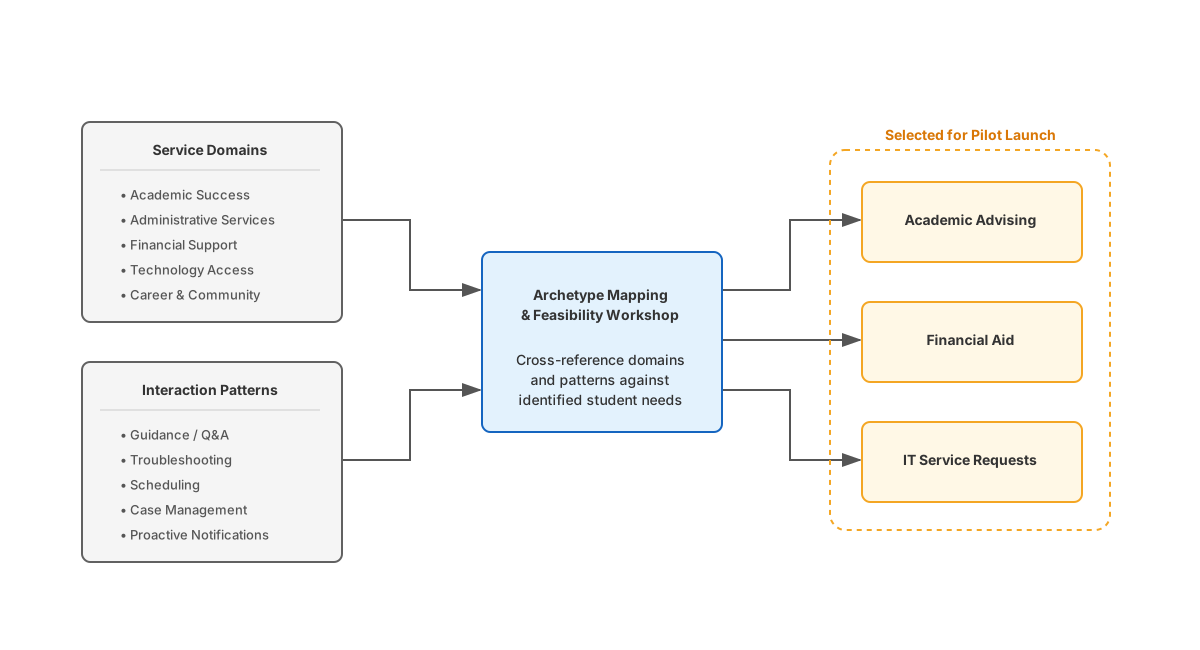
To scope the work, our team ran a workshop mapping service journeys across two axes. The first was
domain
(Academic Success, Administrative Services,
Financial Support, Technology Access, Career & Community) and the second was service pattern
(Guidance/Q&A, Troubleshooting, Scheduling, Case Management, Proactive Notifications). Working
closely with Unisys leadership, our team narrowed 25 potential areas down to three priority
journeys:
Academic Advising, IT Service Requests, and Financial Aid. We made these cuts by cross-referencing
qualitative observations with Unisys's strategic goals, ensuring we targeted
high-friction user pain points where the business could deliver immediate value.
Synthesis workflow filtering 25 potential service intersections down to three priority
journeys for the pilot.
Surveys & Interviews
To validate early assumptions and explore the student experience, our team deployed a Qualtrics
screener
survey followed by semi-structured interviews with four Cornell students. The screener
confirmed our baseline: 67% of respondents sometimes walk away without getting an
answer, citing “hard to know who or where to ask” (67%) and
“takes too long to get a response” (50%) as the top barriers.
Our in-depth interviews revealed two distinct types of friction.
Academic Advising: Answers take anywhere from 2 days to 3 weeks. Three of four
interviewees reported near-miss errors with real financial or academic consequences (e.g.,
almost missing a health insurance waiver deadline worth thousands of dollars). Graduate students
also resent using valuable advisor meeting time for routine administrative questions.
IT & Administrative Troubleshooting: "Not knowing who owns the problem"
causes students to bounce between offices, and re-explaining the issue at every handoff
compounds frustration. Opaque resolution timelines lead many to give up entirely rather than
navigate the paperwork loop.
"Google usually pulls up PDF handbooks from 2018."
"Two misses and I delete the app."
"It feels really scattered, and it's hard to tell which source is the most current or
official."
"I'd also use it late at night when offices are closed, because that's when it's most
frustrating to not know what to do next."
Source citations are non-negotiable. Students need to know where an answer came from, and
trust is fragile. A single wrong response on a high-stakes question can lead students to abandon
the tool entirely. Anything consequential must have a clear path to a human, students value
around-the-clock access to help, and the tool should know enough about a student's program
context to filter out irrelevant policies.
Support Ticket Dataset Analysis
To ground the business case in real operational data, our team analyzed IT and advising tickets dating
back to 2020 from Cornell's College of Human Ecology and Brooks School of Public Policy. The analysis
backed up what the student interviews showed: 18.76% of tickets met near-certain deflection criteria,
21.49% had repetitive subject titles, and 97.91% were marked low or medium priority. Most of the support
volume was procedural rather than complex, which meant a well-built RAG system had a realistic path to
resolving most inquiries automatically.
Projecting this deflection potential to scale, a large research university handling roughly
5,000 Tier-1 tickets per month could save approximately $720,000 annually at a 60% deflection rate.
This also cuts student resolution times from days to under 30 seconds, allowing universities to
reallocate staff toward complex student issues.
The issue categories with the clearest deflection potential included computer-related issues
(11.27%), printer support (6.72%), account access (6.55%), classroom AV (5.30%), software licensing (4.48%),
and VPN setup (1.58%). All had repeatable resolution steps that a RAG knowledge base is built to handle.
Phase II: Pilot User Study
Before moving into the pilot testing, I designed a comprehensive Figma prototype based on the user
journeys mapped in Phase I. My teammate and I then structured usability tests with 30 Cornell
students,
evaluating four targeted mockups derived from this baseline architecture. Testing each participant
across
all four conditions enabled direct comparative analysis rather than relying on inferred preferences.
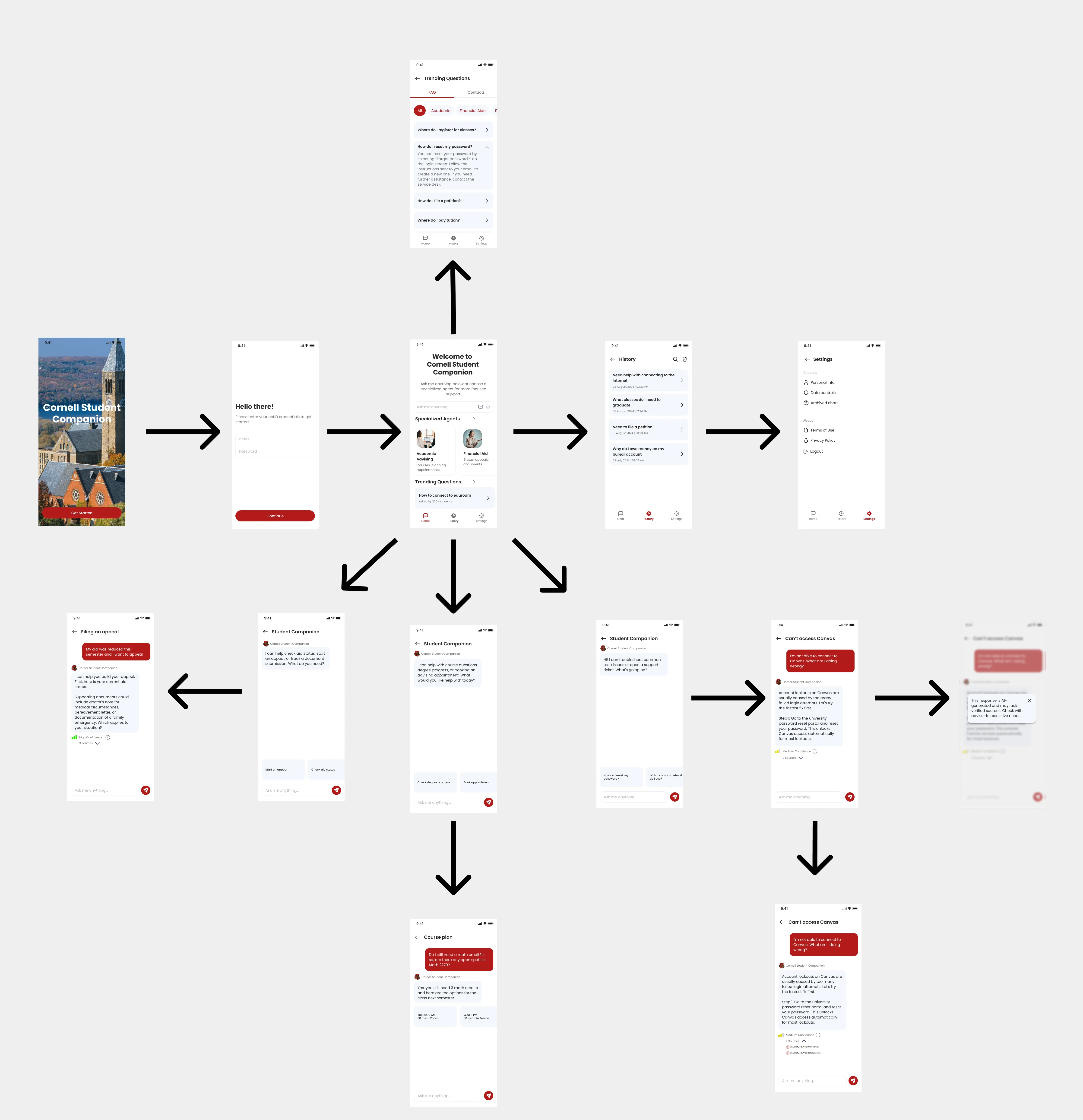
Baseline Prototype & User Journeys
Below are the initial user journeys and corresponding prototype flows mapped out to validate core
interactions before testing access channel preferences.
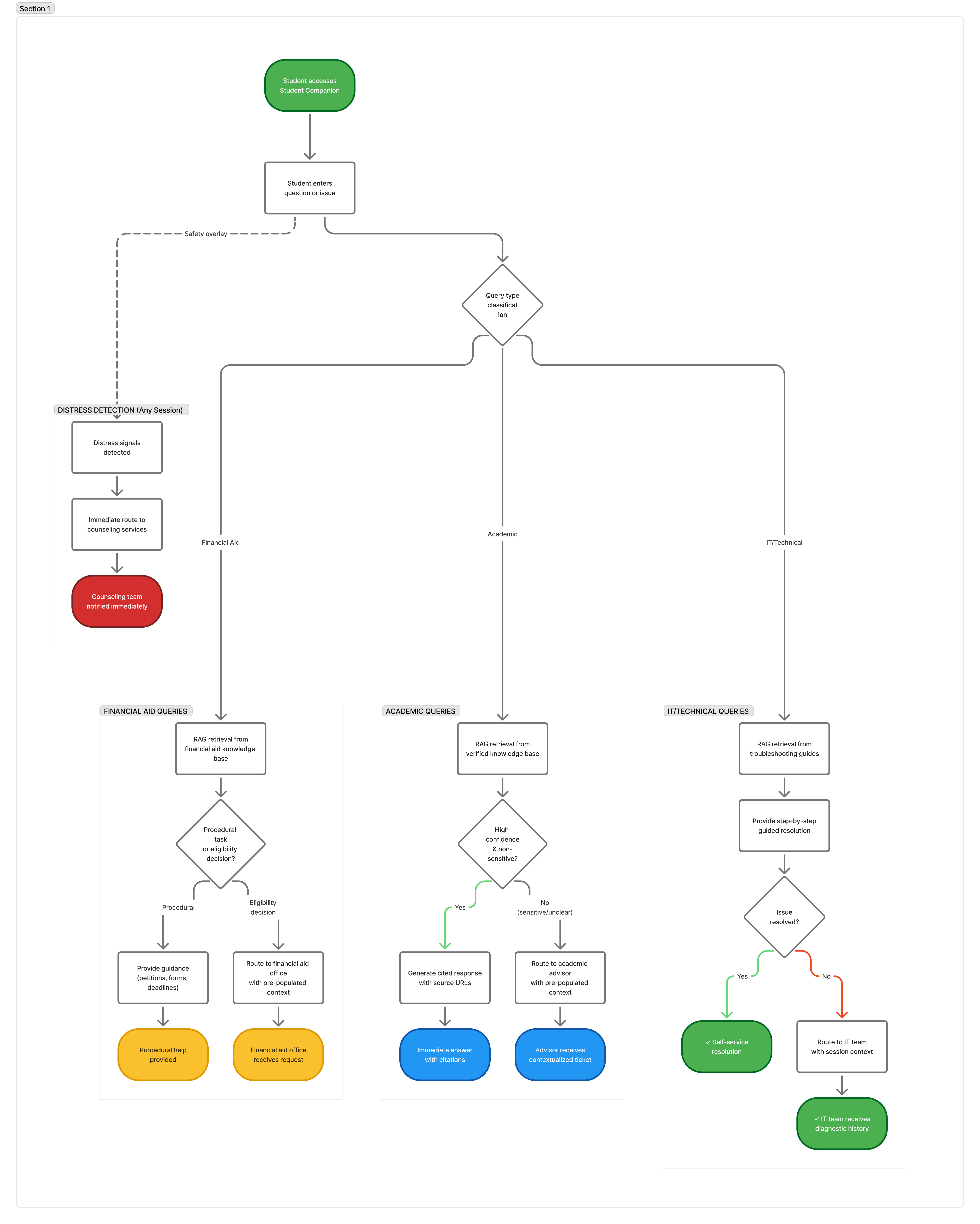
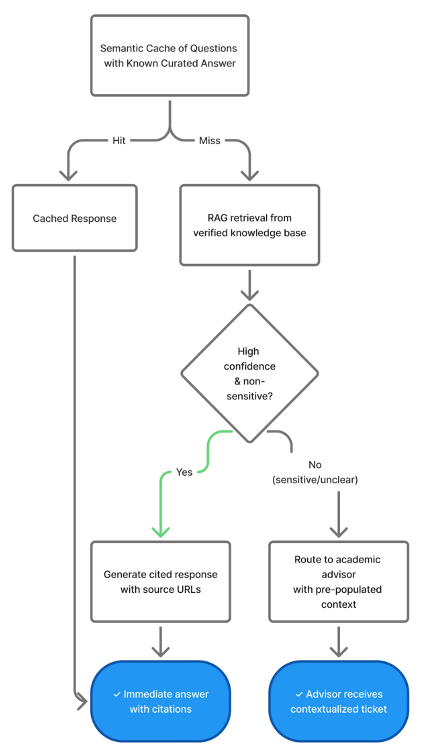
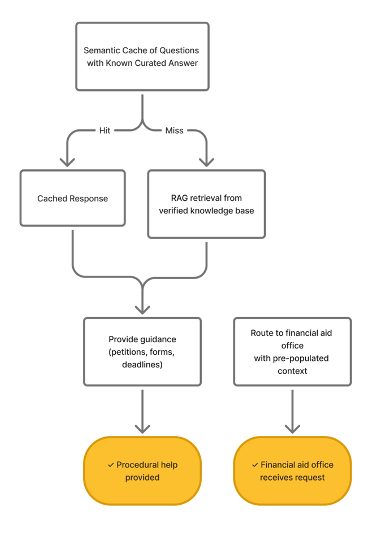
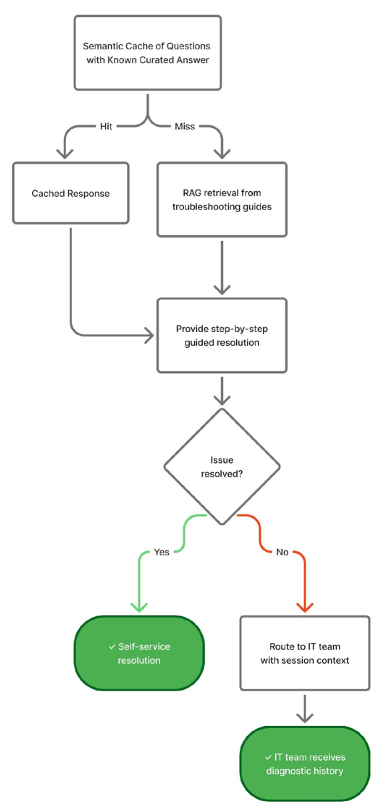
System Logic Flow Diagram
Architectural Wireframes
Academic Advising Flow
Financial Aid Flow
IT Support Flow
The Four Conditions
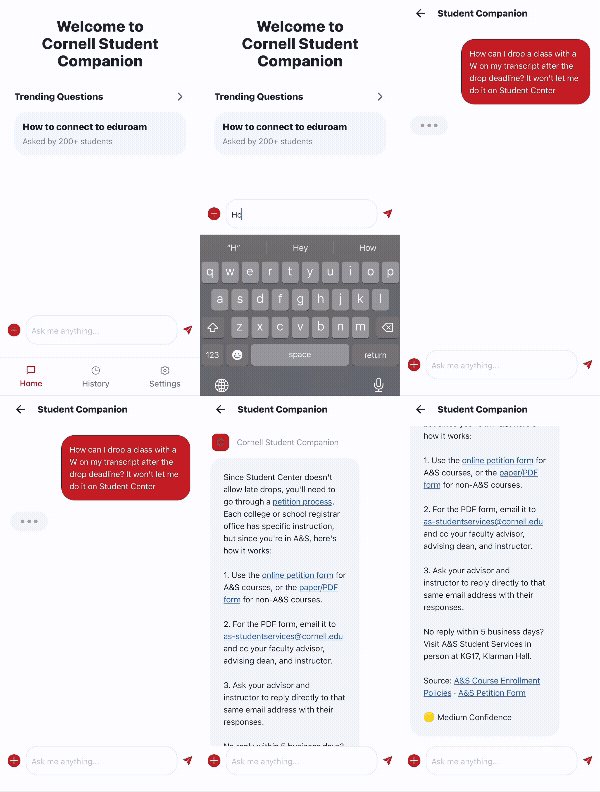
The Specialized App gave each topic type its own entry point, requiring students to categorize
their own question first.
The Unified App presented one general Q&A interface and handled routing internally.
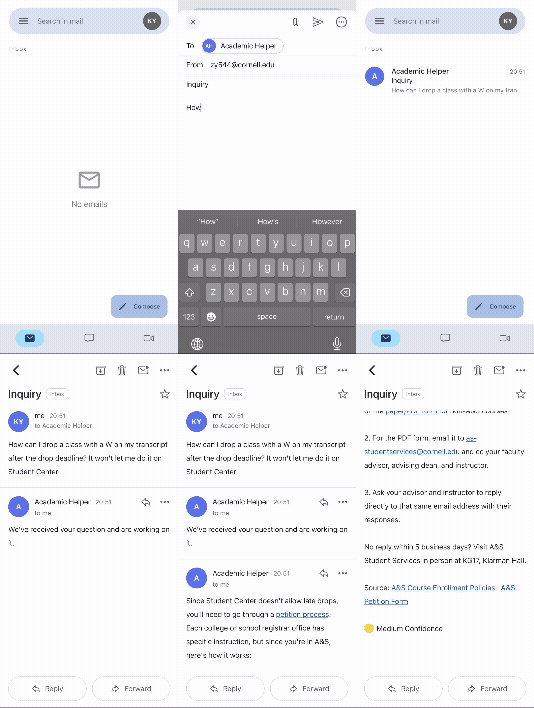
The Email-Style Mockup framed the interaction as a formal, asynchronous Gmail-like experience.
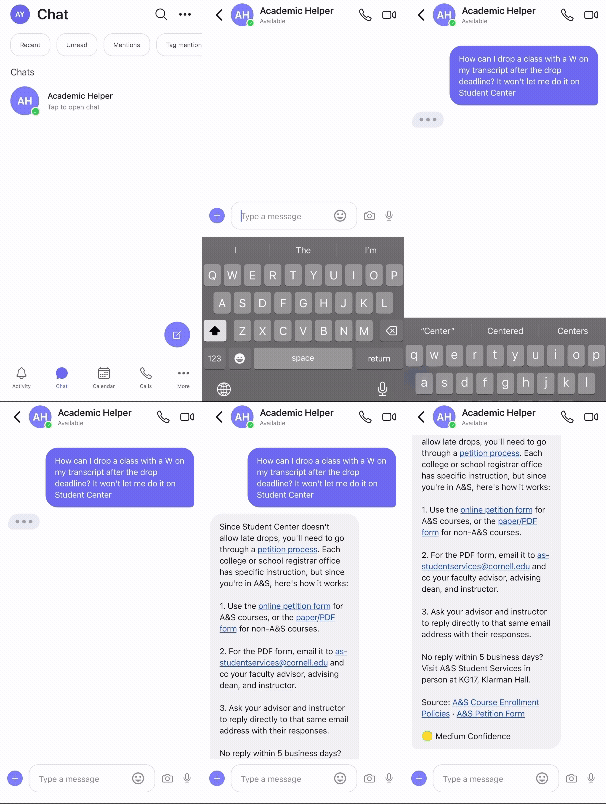
The Chat-Style Mockup used a Teams-like interface for a low-friction, synchronous feel.
Specialized App Mockup
Unified App Mockup
Email-Style Mockup
Chat-Style Mockup
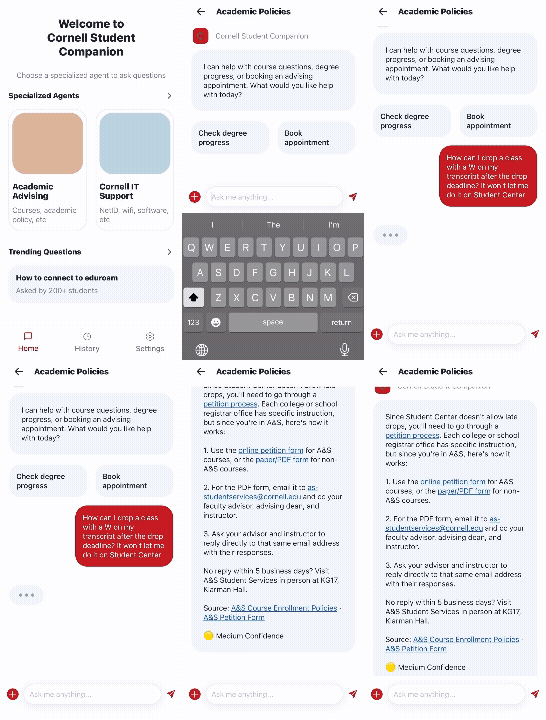
To observe how systems
handled high-stakes constraints, participants were asked to navigate an edge-case scenario.
“How can I drop a class with a W on my transcript after the drop deadline? It won't let me do
it in the Student Center.”
Key Findings
Students preferred the unified interface. They don't want to classify their own questions.
Chat was the preferred channel over email, feeling more natural and lower-friction.
Canvas is the strongest integration point. Students want the service where they already work.
Students valued bullet-pointed answers with embedded links and a Sources section.
Contingency steps were significantly more useful than confidence scores.
A unified, chat-based interface embedded in Canvas emerged as the strongest deployment model for
student services AI.
Strategy & Design
Translating what the research revealed from students and staff, I shaped these insights into concrete
product
requirements, system architecture, and AI safety rules, collaborating with the team on interface
designs and operational planning.
Product Positioning
A competitive scan of higher-ed AI across tools like AdmitHub/Mainstay, ServiceNow, and
general-purpose LLMs
showed that most solutions focus narrowly on admissions, while enterprise ITSM platforms are too
rigid
and expensive for academic advising. I positioned Student Companion to bridge this gap as a
dual-engine
platform, combining RAG-backed policy Q&A with conversational IT troubleshooting and FERPA
compliance
from day one.
As product lead, I authored the PRD that translated these discovery and market insights into a
structured
specification. It covered the core capabilities to build, target deflection metrics, and the
business case
to give the entire team a shared reference point for design and architecture.
Design & Architecture
The MVP prototype and technical architecture were developed in tandem so every interface pattern was
backed by realistic system capabilities. The prototype covers the complete student flow from
onboarding
and topic selection through cited Q&A, step-by-step troubleshooting, and advisor escalation.
Core design
goals throughout focused on reinforcing trust, keeping source citations visible, displaying
confidence
indicators, and making sure a human advisor was always within reach.
Integration Architecture
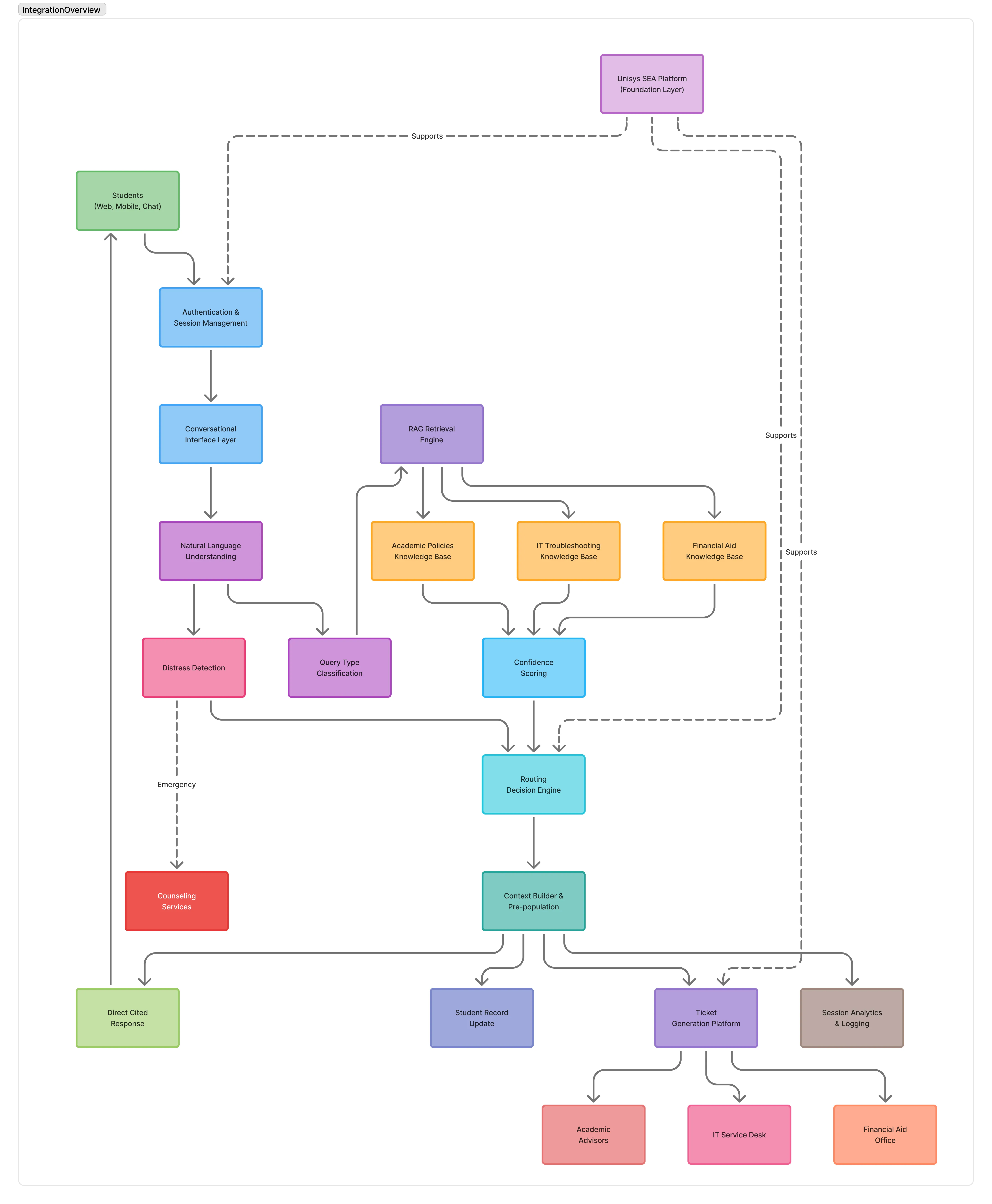
To ensure the interface decisions were technically feasible, the integration architecture maps the
full
system flow from the initial query intake to the cited answer or staff handoff.
Student access layer (web, mobile, chat)
Authentication & session management
Conversational interface layer
Natural language understanding + distress detection
Query type classification (Financial Aid, Academic, IT/Technical)
RAG retrieval from Academic Policies, IT Troubleshooting, and Financial Aid
knowledge bases
Confidence scoring & routing decision engine
Output paths include cited responses, student record updates, ticket generation,
session analytics
Prioritized Capabilities
Feature 1: Q&A Academic Adviser
Students ask questions in plain language and receive answers with source citations, including the
document name, section, and a direct link. When the system isn't confident, it flags the limitation
and routes
to a human with full context pre-filled. I set a specification target of 95%+ response accuracy
based on what
students in our user study indicated would build trust.
Feature 2: Troubleshooting Support
A single entry point for IT, HR, Facilities, and enrollment issues. The system classifies the
problem,
delivers step-by-step guidance, and if it can't resolve the issue, generates a pre-filled support
ticket with an estimated response time. The 60%+ self-resolution target was supported by our team's
ticket
analysis, which showed most submitted issues were procedural rather than complex.
A third module, Financial Aid Support, was included in the pilot scope to validate
advising-style Q&A in a higher-stakes domain. Full GA specification was deferred pending
pilot validation outcomes.
Key Success Metrics
The primary targets were 95%+ response accuracy for the Q&A Adviser and
a 60%+ deflection rate for Troubleshooting. Secondary metrics included escalation
accuracy (correct routing), follow-up rate (repeat queries indicating incomplete resolution),
time-to-resolve, and handoff quality (specifically whether staff found the pre-populated ticket
context actionable).
Business Impact & Scale
A broader financial model translated these operational savings into an estimated 5 to 6x ROI.
Rather than replacing human advisors, the companion takes over routine procedural questions so staff
can
focus on high-value student advising. Across Unisys's global higher-ed sector, the total addressable
market (TAM)
for this expanded capability was calculated at $3.0 billion, demonstrating a strong case for product
expansion.
What Changes for Students
Instead of digging through a patchwork of department websites, students get one place to ask a
question and get a cited answer.
The companion figures out who should handle the question and routes it internally, so students
don't have to navigate department directories themselves.
When something needs to escalate, the companion already has the context written up. Students
don't have to re-explain their issue from scratch.
Students can see an expected response time at the point of escalation. Previously no one told
them how long it would take.
Responsible AI & Governance
Deploying GenAI in higher education requires clear ethical guidelines. The responsible AI framework
defines
how the companion handles high-stakes decisions, protects student privacy, and addresses
university-specific
risks, building directly on Unisys's corporate AI principles to cover campus compliance
requirements.
For high-stakes topics, the companion's job is to inform, prepare, and route, not to make
decisions. Final calls on financial aid, academic standing, or enrollment always go through a
human staff member.
Alignment with Unisys Corporate AI Principles
The system is scoped to defined student benefit and complies with FERPA, CCPA, and ADA Section
508.
AI identity is disclosed at session start, all responses surface cited policy sources, and
low-confidence answers are flagged explicitly.
Bias audits run across demographic personas, with a 95%+ citation accuracy target enforced
through human QA sampling.
Human escalation is mandatory for all consequential decisions and any detected student distress.
PII scope is limited to the session, data is encrypted, and strict vendor processing agreements
are in place.
The interface meets WCAG 2.1 AA standards, supports multiple languages, and is built
mobile-first.
Hallucination Mitigation & Citation Accuracy
We set explicit quality targets to keep the framework accountable. The targets include 95%+ citation
accuracy verified through human QA sampling,
<2% hallucination rate for transactional guidance, 100% source link
availability via automated link checks, and 100% escalation for any
query falling below confidence thresholds.
Escalation Routing
Escalation paths were defined for each domain. Academic advising questions route to the advising
queue (<1 day SLA). Financial aid disputes
route to Financial Aid staff (<2 days). Tier 2 IT issues generate an ITSM ticket (<6 hours).
Detected
student distress triggers an immediate transfer to counseling, with no automated delay and a
required confirmed human handoff.
Data Privacy & Governance
FERPA requires that student education records cannot be disclosed without written consent.
Under CCPA, students have rights to know, delete, and opt out of data sale.
ADA Section 508 requires that platform interfaces are accessible to users with disabilities.
Only data necessary for the immediate request is collected, with no caching of sensitive records
beyond session scope.
Accessibility & Inclusive Design
University systems serve diverse student populations, so the platform had to work for students with
different devices and internet connections. We set requirements for ADA Section 508 and WCAG 2.1 AA
compliance, multilingual detection, and a lightweight mobile interface to ensure reliable access for
everyone.
Responsible AI Risk Summary
Hallucinations in high-stakes policy responses are caught through confidence thresholds and
human QA spot-checks. (Medium likelihood, High impact)
To guard against bias in financial aid guidance, we run audits across diverse user personas and
have SMEs review outputs. (Medium likelihood, High impact)
FERPA violations are prevented through strict data minimization and legal review before any
student data is accessed. (Low likelihood, Critical impact)
If the system detects student distress and fails to escalate, sentiment guardrails and a
mandatory human transfer protocol are the backstop. (Low likelihood, Critical impact)
Outdated policy content is the most likely failure. We address it with versioned RAG and a
30-day content review cycle. (High likelihood, High impact)
Launch & Operations
To turn this concept into a viable offering, the pilot plan and operating model define how the
expanded Student Companion would be deployed, measured, and scaled across university campuses.
Pilot Plan
The pilot is designed for a CSU campus already operating Student Companion, running over
12 weeks across four phases with a cohort of 200–500 opt-in
undergraduate and graduate students. It covers all three prioritized features. These are the Q&A
Academic
Adviser,
Troubleshooting Support, and Financial Aid Support.
Phased Rollout
W1
W2
W3
W4
W5
W6
W7
W8
W9
W10
W11
W12
Pre-Launch
Setup & Config
Controlled Launch
Soft Launch (200 students)
Expanded Access
Full Cohort Rollout
Evaluation
Readout & Decision
Roles & Responsibilities
Running a smooth deployment across university departments requires clear ownership. We mapped out key
operational activities across all five stakeholder groups in a RACI matrix, making sure everyone
understood
who was responsible for delivery, who handled escalations, and who needed to stay informed.
Unisys Product & Engineering: Accountable for technical uptime, core model pipeline integrations, API maintenance, and model drift auditing.
University IT & Systems Admin: Owned student authentication (SSO), data connectors, role-based permissions, and localized SIS updates.
Campus Support & Advisors: Handled escalated inquiries, weekly QA validation of academic guidance, and flag triage.
Governance & Executive Sponsors: Reviewed bi-weekly accuracy audits, compliance adherence, and pilot phase gate decisions.
Measurement Framework
We tracked six metrics across the pilot. Deflection rate (above 60%) was checked weekly.
Citation accuracy (above 95%) and hallucination rate (below 2%)
were reviewed bi-weekly. Escalation accuracy (above 90%) was tracked weekly. Student satisfaction
(above 4.0/5 CSAT) was collected on an ongoing basis, and every distress escalation was verified
to have reached a human.
Scaling Decision Criteria
At the end of the 12 weeks, we'd decide whether to roll out campus-wide based on these numbers.
The thresholds to proceed were deflection above 60%, citation accuracy above 95%, student
satisfaction above 4.0/5, and no unresolved critical incidents. If deflection fell below 40%,
citation accuracy below 90%, or CSAT below 3.5, or if there was any confirmed distress or PII
failure, the rollout would be paused for another iteration.
Reflection
What I Learned
This project gave me firsthand experience designing and pitching an AI support system within a complex institutional environment. Working through the responsible AI framework taught me that governance is where the real product decisions happen, as defining clear boundaries, escalation rules, and fallback paths directly shaped both the system architecture and the student experience. It also reinforced that conversational UX relies far more on graceful error recovery and reliable safety nets than on the chat interface itself, especially when handling sensitive academic and financial aid inquiries. Finally, developing the pilot plan and operating model showed me that research and prototypes only create impact when paired with a practical rollout strategy, which was ultimately what gave Unisys the confidence to adopt our recommendations.